This is another one of those blog posts where I blind you with a boatload of technical nonsense because my brain is getting calcified and I can’t remember things very well anymore.
Since Erlang isn’t a tremendously mainstream language, information on how to set up a development environment is somewhat lacking — especially if you’re a (neo)vim user instead of one of those emacs lunatics ;) The gist of my very personal configuration is an amalgamation of:
- FreeBSD
- tmux
- neovim
- Conqueror of Completion (CoC)
- Erlang Language Protocol (ELP)
- rebar3 with eqwalizer
I’m not the kind of person that spends a tremendous amount of time improving my productivity environment before I can get productive. This isn’t the best, most optimal configuration for hacking Erlang, but it works for me, alright?
tmux
Aside from occasionally fighting with $TERM to get full color support
working, I don’t really configure much in the way of tmux. One of my
philosophies is the radical use of defaults, so I am never surprised when
touching a new machine.
That said, I do like to have a big history buffer on my development machine:
set-option -g history-limit 100000
neovim
This is a bog-standard install with minimal stuff added. I’m still using the
.vim-style configuration file because, despite having written a game in Lua
last year, I still don’t know how to configure neovim in the canonical way. The vast majority of my config is simple, personal preferences, so I’ll highlight one of the only special things I do: When I’m writing code, I like having the sign column (aka the gutter) turned on to flag warnings and errors. I’m also fickle and easily irritated, so I have a button to turn it off, too.
set signcolumn = yes
" Enable/disable the sign column
function! ToggleSignColumn()
    if &signcolumn == 'yes'
        set signcolumn=no
    else
        set signcolumn=yes
    endif
endfunction
nnoremap <C-s> :call ToggleSignColumn()<CR>
It turns out that Ctrl-s is one of the only unbound-by-default key combinations in (neo)vim. Who knew.
Oh, I guess I had to hack on the colorscheme configuration to irritate me less as well. The problem is that, by default, highlighting a paren also highlights its matching partner, while hiding the original paren! The visual effect of this higlight gives the illusion that my cursor has jumped to the partner paren, which is terribly confusing.
" purply goodness
colorscheme zaibatsu
" i like the gutter to be distinct from the rest of the colorscheme
highlight SignColumn guibg=black
" xix the damn paren highlighting in zaibatsu
highlight MatchParen guifg=NONE guibg=#4a4a4a gui=bold cterm=bold,underline
Finally, I read a great blog post about syntax highlighting a few months ago, and while I don’t agree with it totally I think the author makes some really strong arguments. I’m trying to reduce the visual noise of the stuff highlighted when editing Erlang as such:
" Don't highlight atoms
highlight link erlangAtom Normal
Plug
There are a hundred different plugin managers for vim. I don’t have any great affinity toward any of them. I just picked the first one I saw for the package I needed.
To install:
curl -fLo ~/.local/share/nvim/site/autoload/plug.vim --create-dirs https://raw.githubusercontent.com/junegunn/vim-plug/master/plug.vim
Once it’s setup in the vim autoload, add your packages. I like Conqueror of Completion.
"plug stuff
call plug#begin()
Plug 'neoclide/coc.nvim', {'branch': 'release'}
call plug#end()
Once a vim session is running, run the following to actually set up the packages:
:PlugInstall
Conqueror of Completion (CoC)
I know my sense of humor is juvenile, but between y’all and the Code of Conduct pushers, you’re killing me here. What an unfortunate acronym for a great tool.
This is where we start to rapidly accumulate programming language runtimes in order to get anything done. First, you have to have nodejs installed in order to use CoC. Additional-programming-languages-needed-to-run-this-shit counter: 1.
The CoC configuration lives in ~/.config/nvim/coc-settings.json
{
  "diagnostic.infoSign": "i",
  "diagnostic.hintSign": "*",
  "diagnostic.warningSign": "!",
  "languageserver": {
    "erlang": {
      "command": "elp",
      "args: ["server"],
      "filetypes": ["erlang"],
      "settings": {
        "elp": {
          "inlayHints": {
            "parameterHints": {
              "enable": false
            }
          }
        }
      }
    }
  }
}
I have very simple characters for info, hints, and warnings. I think they’re emoji by default which I despise. I don’t remember what parameter hints are, but I turned them off because I didn’t like them. Once again, it works for me, alright?
Erlang Language Protocol
I feel dubious about how language servers are implemented in editors. On one hand, they are generally useful for doing things like providing an in-line definition of a given function signature and its return values. This helps to not break flow. On the other hand, the visual noise of pop-ups, squiggles, highlighting can be majorly distracting Microsoft-inspired braindamage that completely ruins flow. It helps more than it hurts, I guess.
To set it up, you’ll need to have Rust, Java and Scala installed (additional-programming-languages-needed-to-run-this-shit counter is now up to 4, by the way).
The installation is honestly a bit broken, but after beating my head against the wall I can now say these are the Definitive instructions:
# Clone ELP and submodules
git clone --recurse-submodules https://github.com/WhatsApp/erlang-language-platform.git
cd erlang-language-platform

# Build eqwalizer
pushd eqwalizer/eqwalizer
sbt assembly
popd
export ELP_EQWALIZER_PATH=$(find "$(pwd)" -name eqwalizer.jar)

# Clone another copy of eqwalizer elsewhere, apparently because the submodule doesn't have the needed eqwalizer_support directory
git clone https://github.com/whatsapp/eqwalizer
export EQWALIZER_DIR=~/eqwalizer # or where-ever
# go back to your ELP repo dir
cd erlang-language-platform
cargo build --release
cp target/release/elp ~/bin
I wonder if you just shouldn’t recurse submodules and ignore the official instructions? I don’t know. I’m too lazy to send a PR, sorry.
rebar3, eqwalizer
In my projects’ rebar.config, I add eqwalizer as a dependency:
{deps, [
    {eqwalizer_support,
      {git_subdir,
          "https://github.com/whatsapp/eqwalizer.git",
          {branch, "main"},
          "eqwalizer_support"}}
    %, the rest..
]}.
ELP in Action!
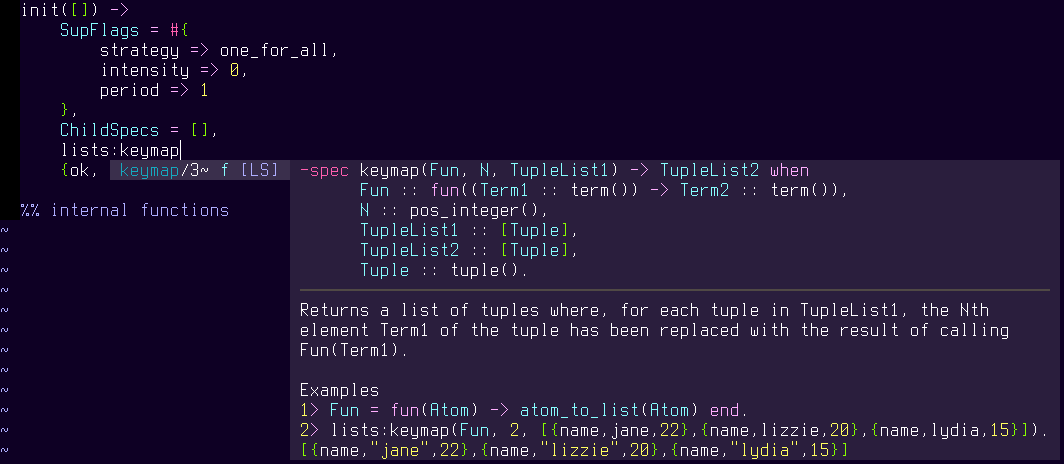
Here’s some screenshots of the whole thing once setup. Function definitions:
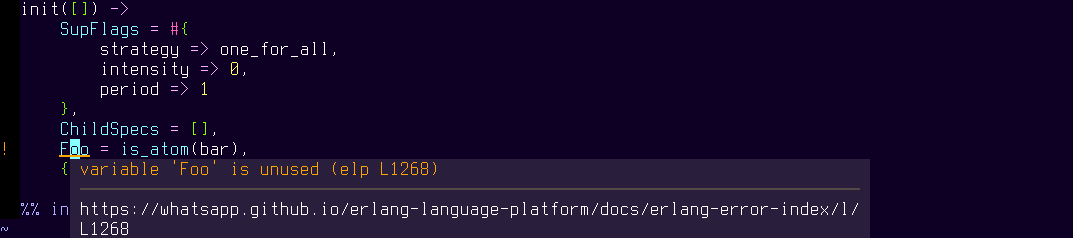
Warning on unused variables:
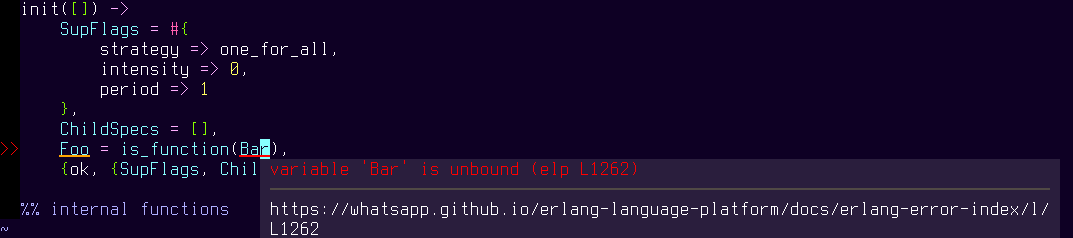
Error on compiler issues: